 Baby Tracker
Bottle and pumping
A bottle logged before it goes cold.
Tap Bottle, nudge the amount with − and +, save. It starts from the last bottle and remembers the milk you used. Pumping gets a timer for each side and the amount when you are done.
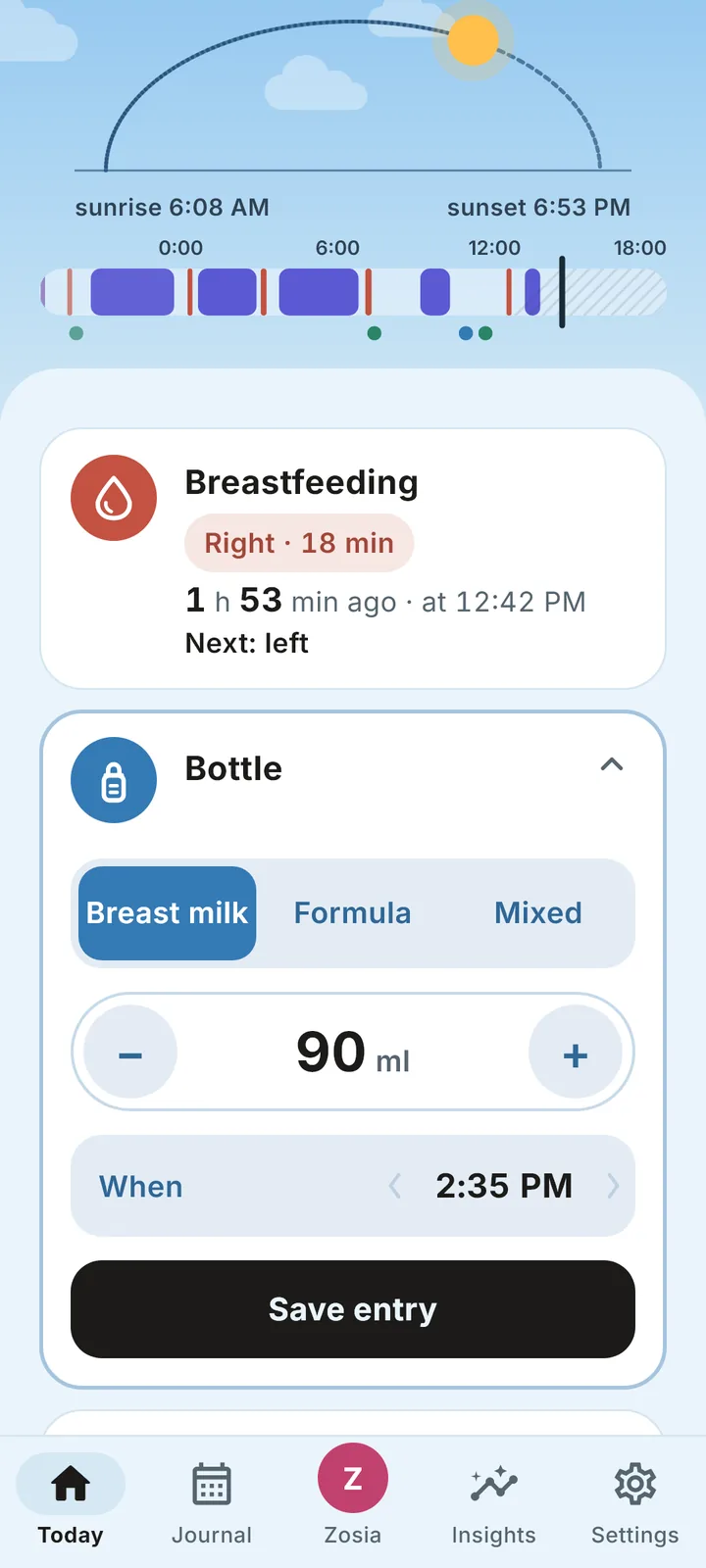
Log a bottle in two taps
A bottle is a single moment, not a session, so there is no timer to stop. Tap Bottle and a small card opens with the amount in the middle and − and + on either side. The amount is already filled in from the last bottle, so most nights it is one tap on Save entry. Change it in steps of 10 ml when the baby drinks more.
Above the amount sit three choices: Breast milk, Formula and Mixed. The app keeps the one you picked last. If you alternate — formula at night, expressed milk by day — it is one extra tap.
Ml or oz, everywhere
Pick the unit once in the settings. Bottles, the totals in Insights and the PDF report for the doctor all follow it. The bottle tile in Insights shows the average per day on days with a bottle, so a mostly breastfed baby with one evening bottle does not look underfed.
Pumping by side, amount afterwards
Tap Pumping and choose Left, Right or Both. The app preselects the side you used last time — most people pump the same way every time, so there is no alternating hint here. Tap Get started and the timer runs like every other timer: it survives a locked phone and a restart, and it can be paused.
When you finish, add how much you pumped, or leave it empty if the bottle is still in the fridge waiting to be measured. Pumping has its own reminder, counted from the last session, if you are building a supply or pumping at work.
Breast and bottle on one timeline
Bottles and breastfeeds land on the same day ribbon on the Today screen, in their own colours. Since feeding counts from whichever came last. In the journal, a bottle shows its amount and milk next to the breastfeeds with their sides and minutes. That combined view is what a doctor or a partner usually wants to see — not two separate lists.
A worked example: on Saturday Tom gives two 120 ml formula bottles while Anna sleeps, and she breastfeeds the rest of the day. In the evening the Today screen shows six feeds and two bottles in the last 24 hours, and the feeding reminder counts from Tom’s last bottle at 9:40 p.m.
Logging a bottle you forgot
Every entry can be added afterwards with its own time — set when the bottle was given and save. Deleted the wrong one? Undo brings it back. More on breastfeeding timers and the side hint on the breastfeeding page.
From the blog: How much should a newborn eat?.
Questions
Can I log bottles in ounces?
Yes. Choose ml or oz in the settings and every bottle, chart and report uses that unit.
Does it tell breast milk and formula apart?
Yes. Each bottle can be breast milk, formula or mixed. The next bottle starts with the milk you chose last time.
How do I log a pumping session?
Tap Pumping, choose Left, Right or Both, and the timer starts. When you finish, you can add how much you pumped, or skip it.
Do bottles count towards feeding reminders?
Yes. The feeding reminder counts from the end of the last breastfeed or bottle, whichever was later.
Your baby’s day, two taps at a time.
Install, add your baby’s name, tap the first feed. No sign-up.
iPhone version later