 Baby Tracker
Pregnancy
Start before the birth.
Choose On the way when you add your baby. Today shows the week of pregnancy and the typical size, with Kicks and Contractions one tap away. When the baby is born, tap The baby is born and the app switches to feeds, sleep and diapers.
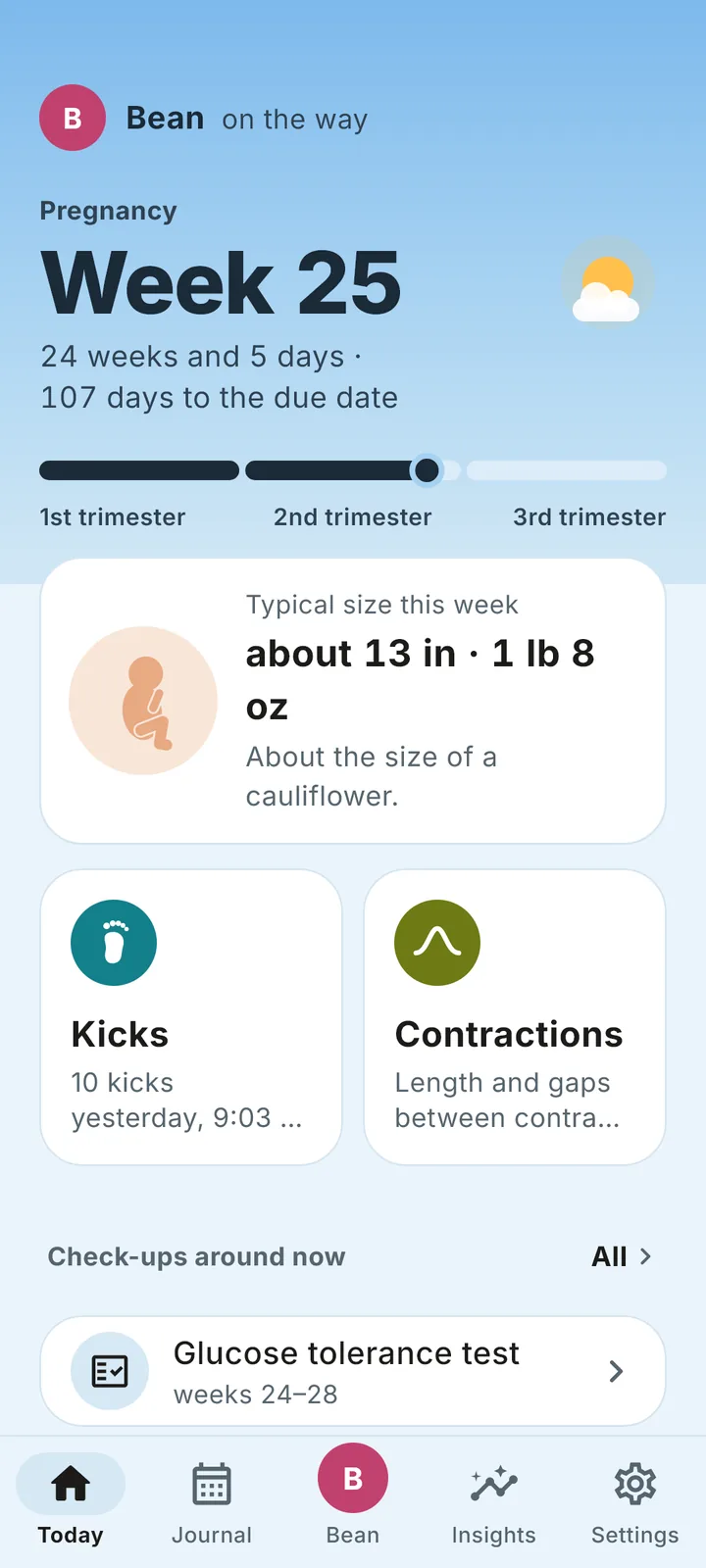
The week of pregnancy, at a glance
The first question in the app is Is your baby already here? Choose On the way, enter the due date — or the first day of your last period — and how many babies you expect. Today becomes a pregnancy screen: under the sky of the time of day, Week 25 in large type with 24 weeks and 5 days · 107 days to the due date, and a 40-week bar in three trimesters.
Below it, Typical size this week: a drawing of the baby at that stage, about 32 cm · 670 g in your units, and a comparison — About the size of a cauliflower. With twins, the app adds that babies are often smaller. It is always typical, never your baby weighs.
Kicks: count them with one tap
The Kicks screen is one big circle: tap it for every movement. It shows how long you have been counting, has Undo one and Finish and save, and keeps your counts from the last 30 days under Earlier. While you count, a notification has +1 kick, so the phone can stay locked. A daily reminder, Time to count kicks, comes at the hour you choose.
There is no target and no score, because your baby’s own pattern is what matters. Try it without the app: the kick counter works in your browser.
Contractions: length and gaps
The Contractions screen times each contraction from start to end and the gap from the start of the previous one. A Last hour card shows how many, how long on average and how far apart. Under it sits the one sentence the app will not go beyond: Agree with your midwife or doctor in advance when to go to the hospital. A browser version works the same way.
The hospital bag and check-ups
Hospital bag is a starter list of 14 things in three groups — documents, for mum, for the baby — that you can change, add to and tick off together. Check-ups lists eight suggestions with their weeks, from the first visit to CTG after the due date, with a now badge in the right week. Both lists are shared with the other parent; changes are for parents only.
A worked example: at week 24 the check-ups card says Now: glucose tolerance test. Ania ticks it after the visit. Tomek adds phone charger to the bag list from his own phone, and it appears with Added by: Tomek.
When the baby is born
From week 37 a card asks whether the baby is already here. Tap The baby is born, enter the date and, if you like, the time, weight and length. Today switches to breastfeeding, sleep and diapers; kick counts and contractions stay in the journal. If the birth was before 37 weeks, the app keeps the due date for corrected age. If the pregnancy ended, the app turns off its reminders and lets you archive or delete the entries.
From the blog: Hospital bag checklist: what to pack and when.
Questions
Is the pregnancy part free?
Yes, all of it: the week of pregnancy, the typical size, kicks, contractions, the hospital bag list, check-ups and their reminders.
Does it work for twins?
Yes. Say how many babies are on the way — up to five. After the birth each baby gets their own profile.
Does the app switch to the newborn by itself?
No, never. You tap The baby is born and enter the date, name, sex and, if you like, the weight and length. Kick counts and contractions stay in the journal.
Which check-ups are on the list?
Eight suggestions from the Polish standard of perinatal care, with the weeks. Hide what you do not do, change a description or add your own check-up with a week — your doctor or midwife may plan others.
Does the app judge my kick count?
No. There is no threshold and no score. If your baby is moving less than usual, call your midwife or maternity unit straight away.
Your baby’s day, two taps at a time.
Install, add your baby’s name, tap the first feed. No sign-up.
iPhone version later